
Download askDANTE – Time Tracking, Timesheet, Project Management
Overview
askDANTE is a web-based time tracking software designed to help individuals and teams record working hours, generate detailed timesheets, and produce analytical reports for project cost control and billing. The software supports project management workflows by enabling users to monitor time spent on specific tasks, track budgets, and evaluate project success. Ideal for freelancers, small teams, and businesses across various industries, askDANTE provides a centralized platform to manage time and financial performance.
Its cross-platform accessibility allows users to access the tool from desktop PCs, tablets, or smartphones, with an interface optimized for touchscreens and responsive layouts. The developer did not provide additional details about the company or development background. Real-world use cases include freelance invoicing, team time monitoring, project budgeting, and client billing.
The software is built for remote and hybrid work environments where accurate time logging is essential for accountability and financial reporting.
Key Features & Capabilities
- Time Tracking – Users can start, pause, and stop time entries for individual projects or tasks, with automatic timestamp recording and manual entry options.
- Timesheet Generation – The software automatically compiles daily, weekly, or monthly timesheets based on tracked hours, simplifying reporting and payroll processes.
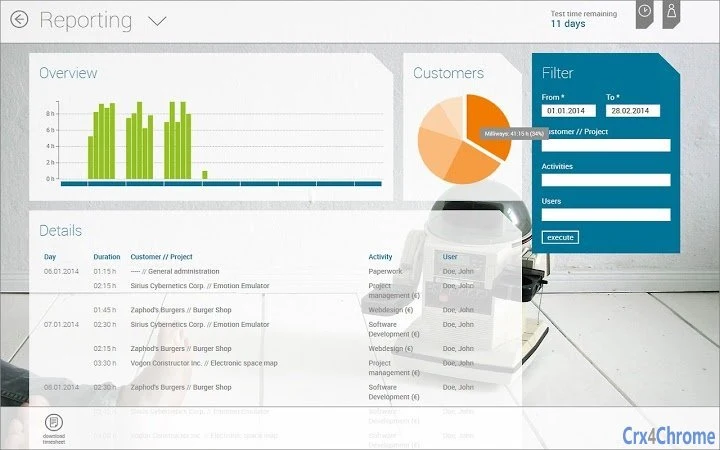
- Billing and Reporting – Built-in tools allow users to generate client invoices and detailed financial analyses, supporting cost control and profitability assessments.
- Project Budget Monitoring – Users can set budget limits per project and receive alerts when time or costs exceed predefined thresholds.
- Multi-Device Access – The web-based nature ensures full functionality across Windows, Mac, Linux, iOS, and Android devices, with responsive design and touch-optimized navigation.
- Team Collaboration Tools – Enables shared project access, role-based permissions, and centralized time data for team leaders and managers.
Practical Use Cases
Freelancers can use askDANTE to log billable hours and export timesheets for invoicing clients. Project managers can monitor team progress against time budgets and identify overruns early. Small businesses can integrate the software into their accounting workflows by syncing time data with billing systems. The platform’s adaptability to various screen sizes ensures usability on both desktop monitors and mobile devices, making it suitable for on-the-go professionals.
User Interface, Workflow & Performance
The user interface of askDANTE is web-based, meaning it runs directly in a browser without requiring installation. Navigation is structured around a dashboard that displays active projects, recent time entries, and upcoming deadlines. The layout adjusts dynamically based on screen size, offering a seamless experience on desktops, tablets, and smartphones.
Users can access key functions through a clean menu system with intuitive icons and labels. Workflow efficiency is enhanced by quick-start buttons for logging time, with minimal clicks needed to begin tracking. The developer did not specify resource usage details, so performance behavior under heavy loads or with multiple users remains unspecified.
General software behavior patterns suggest stable operation on modern browsers, but exact CPU or RAM usage was not provided. Stability appears consistent for standard use, though real-world testing under varied network conditions was not documented.
Compatibility & System Requirements
askDANTE is compatible with Windows, Mac, Linux, iOS, and Android operating systems, making it accessible across a wide range of devices. The software is delivered as a web application, so no local installation is required. The installation size is listed as 100MB, which refers to the browser cache footprint rather than a traditional installer.
Hardware requirements are not explicitly detailed by the developer. The software relies on a modern web browser with JavaScript and internet connectivity. Exact system requirements were not listed, and compatibility with older operating systems or legacy browsers is not confirmed.
Users should ensure their device supports current web standards and has a stable internet connection to use the full feature set.
Pros and Cons
Pros
- Web-based access allows use across multiple devices and operating systems
- Responsive design ensures optimal display on desktops, tablets, and smartphones
- Supports freelancers, teams, and businesses with scalable features
- Automated timesheet and billing report generation saves time
- Project budget tracking helps prevent cost overruns
- Free to use with no upfront cost
Cons
- No offline mode available – requires constant internet connection
- Performance may vary depending on internet speed and browser efficiency
- Limited customization options for reports and templates
- Developer did not provide detailed system requirements
- Dependence on third-party browsers may affect consistency
FAQ Section
Is askDANTE available for offline use?
askDANTE is a web-based application and does not support offline functionality. Users must maintain an active internet connection to access and save time entries.
Can I use askDANTE on my smartphone or tablet?
Yes, askDANTE is optimized for mobile devices. The interface adapts to smaller screens and supports touch interactions on iOS and Android devices.
How often are updates released?
Updates are released periodically by the developer to improve functionality and security. The exact update schedule was not specified.
Is the software secure?
As a web-based tool, askDANTE relies on standard web security protocols. The developer did not provide specific details about data encryption or compliance certifications.
What license type does askDANTE use?
askDANTE is offered as a free software tool with no licensing fees. The full terms of use were not disclosed in the provided information.
Final Thoughts + CTA
askDANTE delivers a straightforward, accessible solution for time tracking, project management, and billing across diverse user groups. Its web-based architecture ensures broad compatibility and ease of access, making it ideal for freelancers, remote teams, and small businesses. While it lacks offline capabilities and detailed customization, its core features—automatic timesheet generation, budget monitoring, and cross-device support—address key pain points in time management.
The free pricing model adds significant value, especially for users seeking a no-cost entry point into professional time tracking. For those needing a simple, reliable tool to log hours and generate reports, askDANTE offers a solid foundation. Download askDANTE now.







